Authentication with OAuth 2.0
This section describes how to configure a TQ Data Foundation server to use OAuth 2.0 for authentication. This is an authentication method that API clients can use to authenticate with Data Foundation.
Data Foundation supports authentication with OAuth 2.0 Client Credentials flow. With this flow, API clients request an access token from an Authorization Server, and then use the token to access TQ APIs. The API client and the Authorization Server share a client secret, which is used to authenticate the token request. The only direct interaction between Data Foundation itself and the Authorization Server is the one-time retrieval of a public key that Data Foundation uses to validate tokens. In this flow, Data Foundation is said to be acting as a Resource Server.
Data Foundation itself can also act as an API client that uses OAuth 2.0 authentication, in particular when accessing another Data Foundation instance that requires authentication with OAuth 2.0. For example, to publish to Explorer using OAuth, see TQ Data Foundation as an OAuth API client for configuring Data Foundation as an OAuth client.
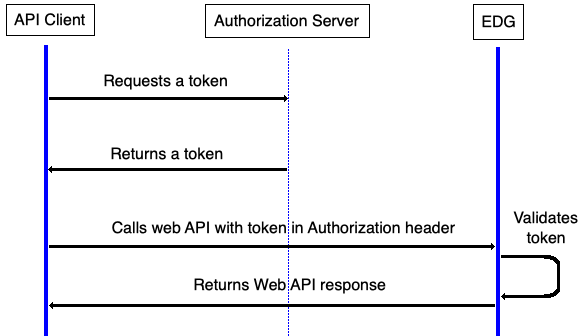
OAuth 2.0 Client Credentials Flow
Considerations
With OAuth, API clients that can access Data Foundation are managed in the identity provider. With HTTP Basic Authentication, they are managed by the Data Foundation administrator in a configuration file.
OAuth is more secure than basic since credentials are not sent with every request to Data Foundation
OAuth can be complex to implement since it is a multi-step protocol that involves an additional party (the Authorization Server) and there is considerable variation between providers.
End-users logging in directly to Data Foundation cannot use this authentication method. It is for authenticating API clients only. See Authentication with OpenID Connect (OIDC) for a related SSO end-user authentication method.
Prerequisites
The Data Foundation administrator must obtain the Authorization Server’s OpenID Provider Configuration URL (ending in
/.well-known/openid-configuration).The administrator should obtain all client IDs that will be used to access Data Foundation, to facilitate configuration of access control.
The access token issued by the Authorization Server must provide an attribute to be used as the user’s role within Data Foundation
Configuring TQ Data Foundation as a Resource Server
Note
When configuring this method of authentication, it is helpful to have a technical resource familiar with the OAuth 2.0 Authorization Server to assist with the configuration. TopQuadrant is unable to assist with specific configuration options for each customer’s Authorization Server.
To enable OAuth 2.0 authentication, add or uncomment in the setup file (edg-setup.properties):
apiAuthMethods = oauth2
Also, create a oauth2.yaml file according to the following section.
The oauth2.yaml file
By default, the system will look for a file oauth2.yaml in the same
directory as the setup file.
If desired, the name and location can be overridden in the setup file:
oauth2ConfigFile = ./my-idp-oauth2.yaml
Syntax
The file uses YAML syntax. It consists of an OAuth 2.0 configuration record of the following form:
authorizationServer: https://your.authorization.server
attributeMappings:
   role: auth-server-role-attribute
A record consits of these elements:
authorizationServer(required)The base URL for the Authorization Server. This is the part that precedes
/.well-known/openid-configurationin the Authorization Server’s OpenID Provider Configuration. See below for examples.attributeMappings(required)This maps the attributes returned by the Authorization Server in the access token to attributes understood by Data Foundation. The left-hand values are Data Foundation attributes; the right-hand values are access token attributes.
The following Data Foundation attributes are supported:
role(required)The access token attribute containing the API user’s group, to be used as an Data Foundation security role. If the token does not provide a suitable attribute, the client ID attribute can be used (see examples below). The group/role name must match one of the
securityRolesdefined in the setup file.name(optional)The access token attribute to use as the service account name in Data Foundation. Defaults to
sub(subject) if not specified. This must be specified if the token does not include asubclaim. Theclient_idattribute is sometimes a suitable alternative.
Note
The service account in Data Foundation that represents the API client will have its name determined by the name attribute mapping. By default, this uses the token’s sub (subject) claim.
If the client ID attribute is mapped to role, then any client IDs used to access Data Foundation must be added as securityRoles.
Example oauth2.yaml file for Okta
authorizationServer: https://your.okta.com/oauth2/default
attributeMappings:
   role: cid
Example oauth2.yaml file for Amazon Cognito
authorizationServer: https://cognito-idp.us-east-1.amazonaws.com/us-east-1_xxxxxxxxx
attributeMappings:
   role: client_id
Example oauth2.yaml file for Microsoft Entra ID
authorizationServer: https://login.microsoftonline.com/xxxxxxxx-xxxx-xxxx-xxxx-xxxxxxxxxxxx/v2.0
attributeMappings:
   role: azp
Note
If using Microsoft Entra ID as the Authorization Server, you will need to configure the Data Foundation app registration to use version 2 tokens:
Go to App Registrations in Entra ID
Select the Data Foundation app
Select Manifest
- Change
"accessTokenAcceptedVersion": null,- to
"accessTokenAcceptedVersion": 2,
Save
This is due to a bug in Entra ID which affects token validation using third-party JWT libraries. Unless you set accessTokenAcceptedVersion to 2, it will default to issuing version 1 tokens, which use a different issuer ID, which causes validation to fail.